Sunday, June 24, 2012

Business Rule Engine: Database Lookup, .Net Helper Class

I was googling for a blog article which could show me  the simplest way of implementing BRE Rules with Database lookup and .net Helper Class. Most of the samples talk of writing everything in a Helper Class with logic to call the Rule. Rest talk of using Facts to pass on the .net Helper Class Instance. Some samples are limited to only Rule Store.....but not about how to call it from Orchestration.

Here I would like to discuss a simple common situation which one comes across while implement Rules in BRE.

In the Screenshot below I have 2 Rules which lookup 2 different tables.
I also have a .net Helper Class method just to convert the string Xml field to GUID since the AccountID  field in the table is of Type GUID and the Xml field is of type string.


The Rules are easy to construct...Just Drag/Drop fields from the XML Schema and the Database table and the XML Helper Class.
The Xml Static Helper Class works in the Business Rules if we add the following Registry key or else the Rules will get executed but the BRE will not output any Error and the HelperClass condition will be skipped.

HKEY_LOCAL_MACHINE\SOFTWARE\Microsoft\BusinessRules\3.0\StaticSupport (DWORD)
HKEY_LOCAL_MACHINE\SOFTWARE\Wow6432Node\Microsoft\BusinessRules\3.0\StaticSupport (DWORD)


To test the Policy ...right click the Version and click Test Policy. Add instance of all inputs(Databases/Xml File but not of .Net Helper Class(It will read from GAC).Now on Click of Test button the Rule will be executed and the Input Xml file will be modified and will act as the Ouput file.


Lets look into how to call the Rule from the Orchestration and the code in the Xml Helper Class.
Call Rules Shape only work in Atomic Shape Scope, So we need to add the Scope and set it to Atomic in the Scope Properties.

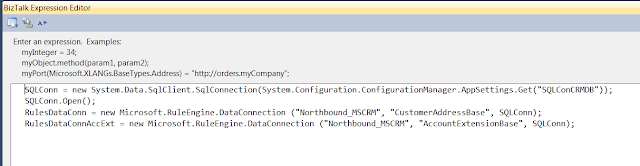
I have add the Expression shape where I set the input parameters to the Call Rules Shape.
SQLConn is the connection to the Database which is used in the Input.
RulesDataConn is the input parameter for the table.
Northbound is a dummy database I have used which contains a table called CustomerAddressBase and AccountExtensionBase.
I am using these 2 tables in 2 different Rules.
I also created the variable for .Net Helper class and pass it on to the Call Rules Shape as below.
Here is is how it looks in the configuration of Call Rules Shape.
Now we have Configured the Orchestration. Below I will show you the type of Variables used above.

Here is the code of the .Net Helper Class which just converts the string from the Xml field to GUID field.
Note: The Helper Class should be static and Serializable as it used in Atomic Shape.
We do not need to create Facts as we are using Static Methods in the Helper Class.


Deploy the Rule from the Rule Store and Deploy the Orchestration and GAC the Helper Class.
After deployment link the Policy to the Application in BizTalk Admin Console.

Now drop the file and Rules should be executed and the Xml file will be created.
This tutorial is just for reference and not a Sample Lab to be followed. It will just help you if you missed any steps in your Project.

Microsoft has many good Samples but without any proper documentation to explain the steps involved ...it only has deployment and test guide to test the Sample.
Hope this guide helps you in implementing BRE using Microsoft Business Rule Composer.

Thursday, June 14, 2012

BAM Add-In Excel Issue : Object library invalid or contains references to object definitions that could not be found.

Recently when I opened Excel every time I got a weird Error for BAM Add-In.
Incidently I have not messed up with BAM recently for sure.  After googling a bit I could not find any post related to BAM Add-In issue but many with VBA macros failing after a Cumulative update.
My laptop is set to auto update the system with latest updates as I love to try new features out in Microsoft market and this Cumulative update had messed up the macro settings in Excel.
http://support.microsoft.com/kb/957924/en-us

The point here is if you get Errors related to BAM Add-In Excel macro while opening Excel just follow these steps
To resolve the problem, delete cached versions of the control type libraries. 
To do this, search the hard disk for “.exd,” and then delete all occurrences. The .exd files are re-created automatically by using the new controls the next time that you use VBA.

After deleting all .exd files(there were only 2 in AppData folder) things were back to normal and BAM Excel Add-In worked fine.

Wednesday, May 30, 2012

BizTalk 2010 - CRM 2011 Errors and Resolution

Hi,
I just thought of posting few common and few uncommon Errors :) you might face during Integrating BizTalk with CRM 2011.


<Fault xmlns="http://www.w3.org/2003/05/soap-envelope"><Code><Value>Sender</Value><Subcode><Value xmlns:a="http://schemas.microsoft.com/net/2005/12/windowscommunicationfoundation/dispatcher">a:    DeserializationFailed </Value></Subcode></Code><Reason><Text xml:lang="en-US">The formatter threw an exception while trying to deserialize the message: There was an error while trying to deserialize parameter http://schemas.microsoft.com/xrm/2011/Contracts/Services:entity. The InnerException message was 'There was an error deserializing the object of type Microsoft.Xrm.Sdk.Entity. The value '' cannot be parsed as the type 'Int32'.'.  Please see InnerException for more details.</Text></Reason></Fault>


Resolution: The File send to CRM has a field with wrong format. Ie the field in CRM expects a Integer Value but a string is send. Check CRM for "Whole Number" fields or Option Set fields. Even Option Set fields needs number as a int without any characters like "," or "." . Change the XSLT value script in BizTalk map to have xs:int as datatype for the Integer field.

For a Float Field in CRM = xs: double in BizTalk value mapping XSLT.

I will keep updating this Post with new Errors encountered in CRM.


Database Lookup Functoid : Multiple Where Clause : CRM PickList field

When integrating CRM I came across a Scenario while mapping a PickList field in CRM using BizTalk. Since we need to send the Index (AttributeValue) of the Value in the Xml to CRM for the PickList field I had to do a look up first to get the Picklist value Index.
Assume my Query is
Select top 1 from StringMap where Value='Staff' and AttributeName='lucky_title'
Staff comes from the Title field in the Input Xml.

Now in traditional Database Lookup Functoid we know about single where clause parameters but what if we have a multiple where clause?
Here is the StringMap table in CRM 2011


In that case what we have to do is add a String Concatenate Functoid or a Scripting Functoid for the Multiple Column and Multiple Value parameter with a separator.
I have used a Scripting Functoid.
select top 1 * from StringMap where Value + '|' +  AttributeName = Title|lucky_title


Sunday, April 15, 2012

CRM 2011 Attribute Lookup: Integrating BizTalk with CRM 2011

Hi Friends,
I have been working on a CRM 2011 Integration using WCF Adapter from BizTalk. Richard Seroter has done a very good job by posting 2 Articles on it which clears most of the basics.
Past few days I have been struggling to get this Lookup thing right. I tried the solution which Richard mentioned but seems he dint test it well...it fails.  I had also posted over msdn forum for help but nothing came up.
http://social.msdn.microsoft.com/Forums/en-US/biztalkgeneral/thread/3b08958a-cd8e-480d-9b35-eccbdfca04f8/#3b08958a-cd8e-480d-9b35-eccbdfca04f8

But this German link helped me a lot. I had to translate it to English but it was worth every penny.
http://www.msdynamics.de/viewtopic.php?f=60&t=12408

So what was the solution?
I had 2 Script functoids as shown in the map below as Richard has in the basic one first Series of CRM Integration.
http://seroter.wordpress.com/2011/02/10/the-good-bad-and-ugly-of-integrating-dynamics-crm-2011-and-biztalk-server-2010/

The C# Script in Functoid1 returns the name of the Key(Attribute Name) which is simple.

The important thing is mapping the value field where we lookup the other Entity which is shown as below

The Script is as below.


This XML works fine against CRM
LogicalName is always the name of the Entity.

So if you would like to work with CRM lookup its easy but hardly any resources online and strangely nothing from Microsoft on documentation regarding Integrating CRM 2011 with BizTalk.
I wasted good enough days banging my head to make this lookup work but its all is worth when you see it working finally.
Just mail me if you have any questions regarding Integration CRM 2011 using WCF Adapter in Biztalk.
Finally thanks Richard for post such valuable content regarding Integrating CRM 2011 using WCF BizTalk Adapter.

Hope this post helps you all!

Saturday, January 28, 2012

Bm.exe is not a valid Win32 App

Hi,
Recently I had an Issue with BAM Bm.exe. I tried to run it through command prompt got a wierd error sayign its not a Valid Win32 Application. I thought its an issue since I installed BizTalk in 32 bit mode on a 64 Bit Windows 7 machine. On googling found nothing ..seems nobody encountered it ever. Finally I thought google wont help looked at bm.exe and found the file size was 0.
Seems it got corrupted somehow. By replacing it with a new bm.exe solved the problem.


So basics do help when google fails to help you.

Saturday, November 19, 2011

Exposed Orchestration as Web service returning void?

Hi,
I was working on an Integration Scenario where we needed to call the BizTalk Orchestration from MS Access.
SO first thing started looking at how could we could send request from MS Access to Biztalk. We wanted a Synchronous Scenario where MS Access sends Request and waits for a Response.
The best option we had was to Expose the Orchestration as Webservice.
We did that and after googling we understood

  •  MS Access cannot consume a WCF Service.
  • To Comsume a BizTalk WCF Service we need to create a Proxy Class.
So finally we thought to settle down for normal SOAP Web-services and exposed our Orchestration as Soap Web-service.
It looked good but we planned to make it more easy to be called from MS Access we thought to have the Web-service Input/Output parameter as string.
So MS Access will send XML in string and get response XML i nstring object.

So we made the changes in Orchestration and republished the Orchestration as Webservice and tried to consume it from a WebService testing tool caleld WCF Strom.
The input was passed on and the Webservice returned void though in BizTalk I noticed that I am returning the right XML.


After googling I found this link where it says we need to fine tune the Webservice to work it out.

I made the changes in my Webservice created by the Webservice Publishing Wizard.

And finally got the Response as string.

Hope it helps you in working with Exposing Orchestration as Webservices.