I was googling for a blog article which could show me the simplest way of implementing BRE Rules with Database lookup and .net Helper Class. Most of the samples talk of writing everything in a Helper Class with logic to call the Rule. Rest talk of using Facts to pass on the .net Helper Class Instance. Some samples are limited to only Rule Store.....but not about how to call it from Orchestration.




Here I would like to discuss a simple common situation which one comes across while implement Rules in BRE.
In the Screenshot below I have 2 Rules which lookup 2 different tables.
I also have a .net Helper Class method just to convert the string Xml field to GUID since the AccountID field in the table is of Type GUID and the Xml field is of type string.

The Rules are easy to construct...Just Drag/Drop fields from the XML Schema and the Database table and the XML Helper Class.
The Xml Static Helper Class works in the Business Rules if we add the following Registry key or else the Rules will get executed but the BRE will not output any Error and the HelperClass condition will be skipped.
HKEY_LOCAL_MACHINE\SOFTWARE\Microsoft\BusinessRules\3.0\StaticSupport (DWORD)
HKEY_LOCAL_MACHINE\SOFTWARE\Wow6432Node\Microsoft\BusinessRules\3.0\StaticSupport (DWORD)

To test the Policy ...right click the Version and click Test Policy. Add instance of all inputs(Databases/Xml File but not of .Net Helper Class(It will read from GAC).Now on Click of Test button the Rule will be executed and the Input Xml file will be modified and will act as the Ouput file.

Lets look into how to call the Rule from the Orchestration and the code in the Xml Helper Class.
Call Rules Shape only work in Atomic Shape Scope, So we need to add the Scope and set it to Atomic in the Scope Properties.
Call Rules Shape only work in Atomic Shape Scope, So we need to add the Scope and set it to Atomic in the Scope Properties.
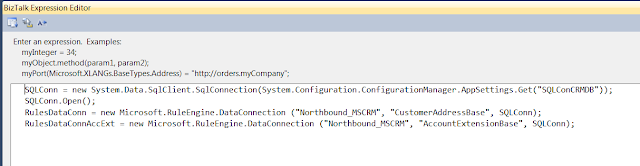
I have add the Expression shape where I set the input parameters to the Call Rules Shape.
SQLConn is the connection to the Database which is used in the Input.
RulesDataConn is the input parameter for the table.
Northbound is a dummy database I have used which contains a table called CustomerAddressBase and AccountExtensionBase.
I am using these 2 tables in 2 different Rules.

I also created the variable for .Net Helper class and pass it on to the Call Rules Shape as below.
Here is is how it looks in the configuration of Call Rules Shape. 
Now we have Configured the Orchestration. Below I will show you the type of Variables used above.

Here is the code of the .Net Helper Class which just converts the string from the Xml field to GUID field.
Note: The Helper Class should be static and Serializable as it used in Atomic Shape.
We do not need to create Facts as we are using Static Methods in the Helper Class.

Deploy the Rule from the Rule Store and Deploy the Orchestration and GAC the Helper Class.
After deployment link the Policy to the Application in BizTalk Admin Console.

Now drop the file and Rules should be executed and the Xml file will be created.
This tutorial is just for reference and not a Sample Lab to be followed. It will just help you if you missed any steps in your Project.
Microsoft has many good Samples but without any proper documentation to explain the steps involved ...it only has deployment and test guide to test the Sample.
Hope this guide helps you in implementing BRE using Microsoft Business Rule Composer.


