Tuesday, February 12, 2008

BiztalkR2 Installation issues


 Installing Biztalk 2006 R2 upto perfection on Multi Server Environment is still a nightmare.
Ideally Biztalk Configuration Management should take care of Basic configurations.
I had to use Custom Configuration Settings to configure it.
Errors I encountered and Resolution.
Business Rule Engine got installed successfully without any errors.
I had Errors with Group and Biztalk Runtime.
Errors with Groups.
Biztalk UserID needs enough rights on the Server.Make sure the Uer is a sysadim on the Server.

Errors with Runtime.
ONe was regarding SQL Server douesnot exist,Database file is not deleted.
Resolution.
In my case Configuration had failed previously,so there were few database files inside MS SQL/Data folder which needs to be deleted.

Creation of Adapter FILE Configuration Store entries failed biztalk runtime configuration.
Just Start the RPC-Local Service inside Windows Services Manager.
Note-There are 2 RPC Services.

After installation I saw few errors in Eventlog.
If you get an error in Eventlog Regarding Some TDDS locks on any of the Biztalk Databases.Refer following link for solution.
http://support.microsoft.com/?scid=kb;en-us;841334&spid=1444&sid=312

I even had issues with Visual Studio 2005 SP2.
error 2755.
I was executing the exe from C Drive.
I just copied it to D Drive and executed it from there....worked fine.Seems some encryption is causing problems for the exe to execute from C Drive.

Thursday, January 17, 2008

Working with Biztalk Database


Count of all Orchestration instances grouped by state
 What it does:   Gives statistical information about all orchestration instances in your system and groups them into the different states they might be in. This type of information is available in the admin MMC by right clicking on an orchestration and selecting properties. This is just a way to rollup all data across all orchestration types and to do it programmatically.
How to read the results: If you have a large number of suspended instances well then something is failing. If you have a large number of dehydrated instances it could indicate a problem with your backend systems not responding promptly or it could just mean that the host in which messaging services are running is not up. If you have a large number of Ready To Run services then either your server is not up or you have a lot of load on your system and are trying hard to keep up. Might not be a problem if we catch up later, but if we can’t catch up then your system is being over driven.
What to do: If they are suspended, you need to look at the suspended info in HAT and determine why they are suspended and do something about. If they are dehydrated and you are concerned, you should look at the message flow to see what they are waiting for and then determine why that message has not come back. If they are ready to run, you should make sure your services are running and then check CPU utilization on these machines and other resource issues because they might be over-driven.
 SET NOCOUNT ON
SET TRANSACTION ISOLATION LEVEL READ COMMITTED
SET DEADLOCK_PRIORITY LOW
 SELECT  o.nvcName AS Orchestration, COUNT(*) as Count,
                CASE i.nState
                                WHEN 1 THEN 'Ready To Run'
                                WHEN 2 THEN 'Active'
                                WHEN 4 THEN 'Suspended Resumable'
                                WHEN 8 THEN 'Dehydrated'
                                WHEN 16 THEN 'Completed With Discarded Messages'
                                WHEN 32 THEN 'Suspended Non-Resumable'
                END as State
FROM [BizTalkMsgboxDb]..[Instances] AS i WITH (NOLOCK)
JOIN [BizTalkMgmtDb]..[bts_Orchestration] AS o WITH (NOLOCK) ON i.uidServiceID = o.uidGUID
--WHERE dtCreated > '2004-08-24 00:00:00' AND dtCreated < '2004-08-24 13:30:00'
GROUP BY o.nvcName, i.nState

Counts for all host queues
What it does:   This will return the table size for the three queues described in the tables section for all applications
How to read the results: If the suspendedQ grows, things are failing. If the workQ grows, you are either over-driving the system, your services are off, or perhaps things have failed and you are going to do retries so the messages are delayed (see valid time). If the state queue grows, you either have a lot of dehydrated orchestrations, or you might be having problems with MSMQt.
What to do: If it is the SuspendedQ, use the error information in HAT and the eventlog to figure out what is failing and fix it. Make sure to either resume or terminate these instances eventually. You don’t want stuff sitting around forever. If it is the workQ, check to make sure the services are running. If they are, check to see if the CPU or other resources are pegged since you might be over driving the system. Also check the evenlog for warnings indicating transport failures which could cause retires. If it is the StateQ, check to see if you have a lot of dehydrated or suspended orchestrations and if so, why. You can also run one of the later queries to try and see if it is an MSMQt instance holding all the references and if so, you are probably not sending data to the outgoing queue anymore because we are still waiting for an ack for an earlier message.
 SET NOCOUNT ON
SET TRANSACTION ISOLATION LEVEL READ COMMITTED
SET DEADLOCK_PRIORITY LOW
 CREATE TABLE #Temp (AppQueue nvarchar(256), QueueSize int)
declare @nvcAppName sysname
declare MyCursor CURSOR FAST_FORWARD FOR
SELECT nvcApplicationName FROM [BizTalkMsgboxDb]..[Applications] WITH (NOLOCK)
 open MyCursor
FETCH NEXT FROM MyCursor INTO @nvcAppName
WHILE (@@FETCH_STATUS = 0)
BEGIN
                INSERT INTO #Temp
                exec ('SELECT ''' + @nvcAppName + 'Q'', COUNT(*) FROM ' + @nvcAppName +'Q WITH (NOLOCK)')
                INSERT INTO #Temp
                exec ('SELECT ''' + @nvcAppName + 'Q_Suspended'', COUNT(*) FROM ' + @nvcAppName +'Q_Suspended WITH (NOLOCK)')
                INSERT INTO #Temp
                exec ('SELECT ''InstanceStateMessageReferences_' + @nvcAppName + ''', COUNT(*) FROM InstanceStateMessageReferences_' + @nvcAppName + '  WITH (NOLOCK)')
                    FETCH NEXT FROM MyCursor INTO @nvcAppName
END 
SELECT * FROM #Temp ORDER BY QueueSize DESC
 close MyCursor
deallocate MyCursor
DROP TABLE #Temp

 Count for number of state messages grouped by instances
What it does:   This will give you a count of the number of state messages associated with each instance
How to read the results: This specific query is probably only useful for systems which use MSMQt as a quick warning when things are starting to go wrong. If you have a lot of messages building up for a specific instance and that instance is an MSMQt instances, you could have problems.
What to do: If you have one of these problematic instances and the service class is MSMQt, you can look at the UserState column to determine what the name of the queue is which we are talking to and then you need to see why the communication with that machines queue is not working. If this is an orchestration, it is possible this is simply expected. It depends on your business logic as to why so many messages are going to the same instance.
 SET NOCOUNT ON
SET TRANSACTION ISOLATION LEVEL READ COMMITTED
SET DEADLOCK_PRIORITY LOW
 CREATE TABLE #Temp (AppName nvarchar(256), StateMessages int, InstanceID uniqueidentifier, ServiceClassID uniqueidentifier, ServiceState nvarchar(256))
declare @nvcAppName sysname
declare MyCursor CURSOR FAST_FORWARD FOR
SELECT nvcApplicationName FROM [BizTalkMsgboxDb]..[Applications] WITH (NOLOCK)
open MyCursor
FETCH NEXT FROM MyCursor INTO @nvcAppName
WHILE (@@FETCH_STATUS = 0)
BEGIN
                INSERT INTO #Temp
                exec ('SELECT ''' + @nvcAppName + ''', COUNT(*), i.uidInstanceID, i.uidClassID, i.nvcUserState FROM InstanceStateMessageReferences_' + @nvcAppName + ' AS s WITH (NOLOCK) JOIN Instances AS i WITH (NOLOCK) ON s.uidInstanceID = i.uidInstanceID GROUP BY i.uidInstanceID, i.uidClassID, i.nvcUserState')
                    FETCH NEXT FROM MyCursor INTO @nvcAppName
END
SELECT * FROM #Temp ORDER BY StateMessages DESC
 close MyCursor
deallocate MyCursor
DROP TABLE #Temp

Count of all active messages for a specific sendport
What it does:   This query not only gives the count for how many messages are in the workQ for a given sendport, but it will do a breakdown based upon the primary and secondary transport also. Even better, it will give you a count for the maximum number of retries any message is on.
How to read the results: Having a high number for a certain transport is not necessarily worrying. It is basically the same as having a lot of data in the workQ generically and could just mean your system is slow. If you retry count is high it means things are failing. If you have a lot of messages on the secondary transport, then things never succeeded on the primary and now have failed over to the secondary transport
What to do: You should look in the eventlog for information on why the failures are happening and perhaps look into the system which this sendport is communicating with the to figure out what the problem is.
 SET NOCOUNT ON
SET TRANSACTION ISOLATION LEVEL READ COMMITTED
SET DEADLOCK_PRIORITY LOW
 CREATE TABLE #Temp (MaxRetries int, Active int, SendPort nvarchar(256), IsPrimaryTransport int)
declare @nvcAppName sysname
declare MyCursor CURSOR FAST_FORWARD FOR
SELECT nvcApplicationName FROM [BizTalkMsgboxDb]..[Applications] WITH (NOLOCK)
open MyCursor
FETCH NEXT FROM MyCursor INTO @nvcAppName
WHILE (@@FETCH_STATUS = 0)
BEGIN
                INSERT INTO #Temp
                exec ('      SELECT    MAX(q.nRetryCount) AS MaxRetries
                                                  ,COUNT(*) AS Active
                                                  ,sp.nvcName AS SendHandlersHostServiceName
                                                  ,spt.bIsPrimary AS IsPrimaryTransport
                                FROM ' +  @nvcAppName + 'Q as q WITH (NOLOCK)
                                                  INNER LOOP JOIN Subscription as s WITH (NOLOCK) ON q.uidServiceID = s.uidServiceID AND s.uidPortID = q.uidPortID
                                                  INNER LOOP JOIN [BizTalkMgmtDb]..[bts_sendport] as sp WITH (NOLOCK) ON q.uidServiceID = sp.uidGUID
                                                  INNER LOOP JOIN [BizTalkMgmtDb]..[bts_sendport_transport] as spt WITH (NOLOCK) ON sp.nID = spt.nSendPortID AND spt.uidGUID = q.uidPortID
                                GROUP BY  sp.nvcName, s.uidPortID, spt.bIsPrimary
                                ORDER BY  SendHandlersHostServiceName ASC')

                FETCH NEXT FROM MyCursor INTO @nvcAppName
END 
SELECT * FROM #Temp ORDER BY Active DESC

close MyCursor
deallocate MyCursor
DROP TABLE #Temp

Last duration for our SQL Agent jobs
What it does:   This will give you a view into when each job last ran and how long it took. This is important to monitor not just because of the data it gives you but also to make sure you realize the importance of having sql agent running.
How to read the results: If the jobs start taking a long time, you could have database resource issues. Either you are running out of CPU or perhaps your disk is getting thrashed. If the job failed, it could be because of a number of deadlock issues which we are fixing in SP1 or have fixed in QFEs.
What to do: If it is a resource issue, you might need to consider beefing up your sql server. If the issue only happens rarely, then you are probably okay as we will catch up. If a failure occurred due to deadlock, you could consider getting SP1 if it has released yet as we fix a number of these issues. There is also a QFE out for deadlocking in the TrackedMessages_Copy job. In general, the deadlocks will not seriously hurt your system as long as they don’t occur too often. The job will fail and we will just have more work to do next time it kicks in.
 SET NOCOUNT ON
SET TRANSACTION ISOLATION LEVEL READ COMMITTED
SET DEADLOCK_PRIORITY LOW
 CREATE TABLE #Temp (JobID uniqueidentifier,
                    JobName sysname,
                    Status int,
                    DateStarted int,
                    TimeStarted int,
                    Duration int,
                    OpEmailed nvarchar(20),
                    OpNetSent nvarchar(20),
                    OpPaged nvarchar(20),
                    Retries int,
                    Server nvarchar(30)
                    )
 CREATE TABLE #Final (MessageBox sysname,
                                    JobName sysname,
                                    DateStarted int,
                                    TimeStarted int,
                                    Duration int,
                    Status int
                    )

declare @dbName sysname
declare MyCursor cursor FAST_FORWARD FOR
select DBName FROM [BizTalkMgmtDb]..[adm_MessageBox] WITH (NOLOCK)
 open MyCursor
 FETCH NEXT FROM MyCursor INTO @dbName
WHILE (@@FETCH_STATUS = 0)
BEGIN
     INSERT INTO #Temp
    exec ('[msdb]..[sp_help_jobhistory] @job_name = ''MessageBox_DeadProcesses_Cleanup_' + @dbName + '''')
    INSERT INTO #Final
    SELECT TOP 1 @dbName, JobName, DateStarted, TimeStarted, Duration, Status FROM #Temp
    TRUNCATE TABLE #Temp  

    INSERT INTO #Temp
    exec ('[msdb]..[sp_help_jobhistory] @job_name = ''MessageBox_Message_Cleanup_' + @dbName + '''')
    INSERT INTO #Final
    SELECT TOP 1 @dbName, JobName, DateStarted, TimeStarted, Duration, Status FROM #Temp
    TRUNCATE TABLE #Temp  

    INSERT INTO #Temp
    exec ('[msdb]..[sp_help_jobhistory] @job_name = ''MessageBox_Parts_Cleanup_' + @dbName + '''')
    INSERT INTO #Final
    SELECT TOP 1 @dbName, JobName, DateStarted, TimeStarted, Duration, Status FROM #Temp
    TRUNCATE TABLE #Temp  

    INSERT INTO #Temp
    exec ('[msdb]..[sp_help_jobhistory] @job_name = ''PurgeSubscriptionsJob_' + @dbName + '''')
    INSERT INTO #Final
    SELECT TOP 1 @dbName, JobName, DateStarted, TimeStarted, Duration, Status FROM #Temp
    TRUNCATE TABLE #Temp  

    INSERT INTO #Temp
    exec ('[msdb]..[sp_help_jobhistory] @job_name = ''TrackedMessages_Copy_' + @dbName + '''')
    INSERT INTO #Final
    SELECT TOP 1 @dbName, JobName, DateStarted, TimeStarted, Duration, Status FROM #Temp
    TRUNCATE TABLE #Temp  
   FETCH NEXT FROM MyCursor INTO @dbName
END

SELECT * FROM #Final ORDER BY MessageBox
close MyCursor
deallocate MyCursor
 drop table #Temp
drop table #Final

Sunday, December 30, 2007

Finding the Original Filename Processed by BizTalk Server

A common BizTalk implementation starts with business partners (customers, vendors, etc.) transmitting files to you via FTP in their own file format. Then BizTalk transforms that file into your company's standard XML format. Next, your existing systems process that XML file as normal. This simplifies application architecture, because for each new business partner you simply need to add an FTP site, a BizTalk Document Specification, a BizTalk Map, a BizTalk Port, and a BizTalk File Receive Function. While it seems like a large number of items that need to be created for each new business partner, it is much, much easier than creating a new application for each new business partner. The combined time to create all of these new items should be 5 - 30 minutes, depending on how complex the documents are.
If you have a business partner that sends information in the filename (e.g., Check12345.txt) that you need during your processing, you will need to perform a not-so-obvious step, that is not well documented, in order to find out the name of the file sent in by the business partner.

Where Does BizTalk Store Original Filenames
BizTalk tracks the files that it processes in its database (InterchangeDTA). If you have BizTalk write the transformed file out as file%tracking_id%.xml then you will end up with a filename like this: file{544191B6-6755-4AF7-8B82-C53C24B2A2D4}.xml. You can easily parse the Tracking GUID out of this.

Once you have the Tracking GUID, which is the unique identifier that BizTalk uses internally, you can query the InterchangeDTA database for the original name of the file. The query joins four tables:
      Select data.nvcOriginalFileName as Filename
      From  dta_indoc_details inDoc,
            dta_outdoc_details outDoc,
            dta_interchange_details details,
            dta_interchange_data data
      Where outDoc.nInDocKey = inDoc.nInDocKey and
            inDoc.nInterchangeKey = details.nInterchangeKey and
            details.nInterchangeDataKey = data.nInterchangeDataKey and
            outDoc.uidTrackingGUID ='{544191B6-6755-4AF7-8B82-C53C24B2A2D4}'

And there you have it. A (somewhat) simple query will return the original filename from the Tracking GUID. 

Thursday, April 19, 2007

Peeping Inside BizTalk


Developers can easily develop Interfaces using BizTalk. On the Stage the BizTalk Show looks cool but have you thought about who writes the Scripts in background. Its only Drag and Drop for developers and once the solution is deployed and it's up to be tested. At times one must have thought what happens when I drop a message, where it goes and how the whole mechanism works. Just go through the artifacts below ….its worth having a look and I bet you would say….”Hey I dint knew this at all”.
Message
1.      Information about the promoted properties is extracted and stored in the bts_documentSpec table in the Management database.
2.      Items that are marked with PropertyField annotations in your message schema will lead to the pipeline disassembler putting a Promoted property in the context. Items that are marked with DistinguishedField annotations in your message schema will lead to the pipeline disassembler putting a Written property into the context.
3.      One of the benefits of promoted properties is that the value of the element that is promoted is available in the context of the message. This means that retrieving that value is inexpensive, as it does not require loading the message into memory to execute an XPath statement on the message. Instead, a simple property bag can be used along with a key to get the value.
4.      Writing a value into the context with the same name and namespace that were used previously to promote the property causes that property to no longer be promoted. The write essentially overwrites the promotion.

Suscriptions:-Instance, Activation
1.      An activation subscription is one specifying that a message that fulfills the subscription should activate, or create, a new instance of the subscriber when it is received. Examples of things that create activation subscriptions include send ports with filters or send ports that are bound to orchestrations, and orchestration receive shapes that have their Activate property set to true. An instance subscription indicates that messages that fulfill the subscription should be routed to an already-running instance of the subscriber. Examples of things that create instance subscriptions are orchestrations with correlated receives and request/response-style receive ports waiting  for a response from BizTalk Server.

2.      The difference between the two types of subscription at the information level is that an instance subscription includes the unique instance ID, stored in the subscription table in the master MessageBox database. When an  orchestration instance or receive port completes processing, instance subscriptions are removed from the MessageBox while activation subscriptions remain active as long as the orchestration or send port is enlisted.
ReceiveSubscription

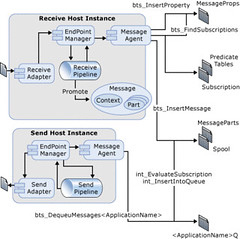
Picture above shows what Biztalk actually does when a message comes in or is going out.We dont see it in Biztalk architecture diagram.

What Adapter does with the Message
1.      The adapter creates a message (an implementation of the Microsoft.BizTalk.Message.Interop.IBaseMessage interface), adds a part to it (an implementation of the Microsoft.BizTalk.Message.Interop.IBasePart interface), and provides the  stream of data as the part content, the adapter writes and promotes into the message context properties related to the location, adapter type, and others related to the adapter. After the message and its context have been created, the adapter passes the message to the Endpoint Manager. The message is then processed through the receive pipeline, which has been configured for the receive location. After the message has been processed by the pipeline, a map may  be used to transform the message into the format desired before the Endpoint Manager publishes the message with the  Message Agent.

Out of Memory Problems: Why?
1.      Routing only If BizTalk Server is only used only for routing messages based upon promoted message properties, then  the message is streamed into the Messagebox database using the .NET XmlReader interface, and message parts are not  individually loaded into memory. In this scenario, out of memory errors are not an issue and the primary  consideration is the amount of time that is required to write very large messages (over 100 MB) into the Messagebox  database.The BizTalk Server development team has successfully tested the processing of messages up to 1 GB in size   when performing routing only.

2.       Mapping Transforming a document with a map is a memory-intensive operation. When a document is transformed by a map, BizTalk Server passes the message stream to the .Net XslTransform class, which then loads the document into a .NET  XPathDocument object for processing. Loading the document into the .NET XPathDocument can potentially expand the original file size in memory by a factor of 10 or more. This expansion may be more pronounced when mapping flat files because flat files must be parsed into XML before they can be transformed.

Solution:-
1.       Adjust the message size threshold above which documents are buffered to the file system during mapping. To modify the size threshold, create a DWORD value named TransformThreshold at the following location in the BizTalk Server  registry:
        HKLM\Software\Microsoft\BizTalk Server\3.0\Administration\TransformThreshold
        After you have created this value, enter a decimal value with the number of bytes to set the new threshold to. For  example, enter a decimal value of 2097152 to increase the message size threshold to 2 MB (from the default of 1 MB). Increase this value on systems with a large amount of available memory to improve throughput. Buffering documents to disk conserves memory at a slight cost to overall throughput.
All Inputs above are Courtesy to Microsoft.

Sunday, December 3, 2006

Passed 70-235 Exam


Today Sunday, December 03, 2006, I cleared Biztalk Server 2006 Exam. Scored 928.
Exam was pretty tough.Stressing more on BAM,BRE,Trouble shooting. Its better one refers msdn for technical articles.You need to be prepared technically before you take it up or else it would be just a waste of money. Hardly any questions on Orchestration.I cant disclose more as we sign an NDA before we appear for the exam. Anyways Best of Luck for the ones who plan to take it up. Now I need to get back to work as I took 1 week off to prepare for this.
You can view my transcript at.
https://mcp.microsoft.com/authenticate/validatemcp.aspx
Transcript ID:747344
Access Code:NISH2006

Wednesday, November 15, 2006

Writing to Eventlog while working with maps using Eventlog Functoid in Biztalk Server 2004


Writing to Eventlog while working with maps using Eventlog Functoid in Biztalk Server 2004

While testing our maps at times when it fails we feel that what could have went wrong and we cant trace it because we don’t know what the output of the functiods are. Normally in a single map we use normally 50-60 functiods.Were do we start debugging our Map. It’s tough when we are under pressure to deliver it on time to debug a map. But it’s a part of our job to make sure that our map is stable. I thought of this functiod while working on a project where in I wanted to see the output of a specific Scripting functiod.
So I just planned to have one which will write to Eventlog any output of data type string. So now what we need to do is just use this functiod to insert into Eventlog.This functiod will return the string after writing it to Eventlog. So just at an overhead of 1 functiod we can test our map to perfection.Just build the solution and drop theEventlogFunctiod.dll in
C:\Program Files\Microsoft BizTalk Server 2004\Developer Tools\Mapper Extensions
And  also GAC it. Then add it in the toolbox and use it in your maps.
Hope it helps you in your project.
The code is given below

using System;
using Microsoft.BizTalk.BaseFunctoids;
using System.Reflection;
using System.Xml;
using System.Diagnostics;
//Summary
//This Class will write an entry in event log.
//It will take up 1 parameter as input and will output the same parameter after writing it to eventlog
namespace EventlogFunctiods
{
 public class EventlogFunctoid: BaseFunctoid
 {
  public EventlogFunctoid()
  {
   this.ID = 6464;  
   SetName("EventLog");
   SetTooltip("Please pass only 1 parameter");
   SetDescription("This Functiod writes the specified parameter to Eventlog.It takes up only 1 paramter");  
   this.SetMinParams(1);
   this.SetMaxParams(1);
   SetExternalFunctionName(GetType().Assembly.FullName,
    "EventlogFunctiods.EventlogFunctoid", "EventlogFunc");
   this.Category = FunctoidCategory.String;
   this.OutputConnectionType = ConnectionType.AllExceptRecord;
   AddInputConnectionType(ConnectionType.AllExceptRecord);  
  }
  public string EventlogFunc(string param1)
  {
   System.Diagnostics.EventLog.WriteEntry("Eventlog-Functiod",param1);
   return param1;  
  }
 }
If you find it tough to implement....just download the solution which is available at
Any queries or bugs would be appreciated because “To err is human”.

Wednesday, May 3, 2006

Storing Usernames, Passwords in SSODB Database using MMC 3.0


Whenever we work on BizTalk projects we feel why there is no provision for App.Config file so that one can store Key/Value pairs in it. So to have a work around for it we save key/value pair in Btsntsvc.exe.config file.
It is one of the easiest work around.
1. But can you store sensitive data like your domain password in a  place which is visible and accessible to all.
2. Do you feel changing btsntsvc.exe.config file is right from developer point of view.
I do feel your answer is No…not at all. Well in such scenario SSODB comes in picture. The key/value pair is stored in encrypted format so nobody can access sensitive data. No btsntsvc.config file is involved in it. Single Sign-On database (SSODB) is a standard Database which gets installed while one installs BizTalk Server.
My Dummy Solution contains 3 projects.
1. SSODB Helper class to query SSODB.
2. MMC3.0 Snap-in for Administrators to add key/value pairs.
3. Windows Form to test the SSODB helper class.
We can user SSODB Helper class in our Orchestration to get any key/value pair. I won’t get into technical details of how to develop it. MMC 3.0 developments with C# is not officially supported by Microsoft. "Sample Snap In" development code can be downloaded from Microsoft site.
http://msdn.microsoft.com/library/default.asp?url=/library/en-us/managedMMC/html/a335f609-a929-449a-86f6-29ac7c227709.asp
I had a thread running regarding Developing "MMC 3.0 Snap IN" at
http://groups.google.com/group/microsoft.public.management.mmc/browse_thread/thread/88b4e3da49af3ceb/71f5ee87514f63ac?lnk=gst&q=mmc3.0&rnum=12&hl=en#71f5ee87514f63ac
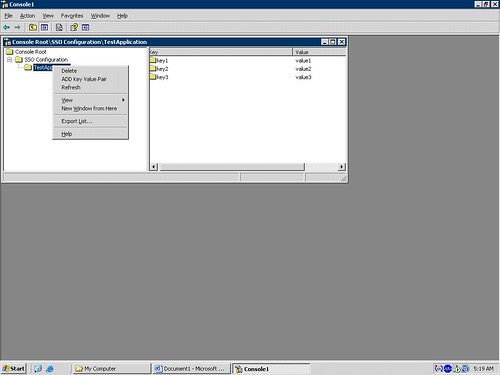
 The Snap-In looks like the one below. One can create Application…which in turn contains Key/value pairs. SSODB stores in terms of Application Name-ConfigName-Key/value pairs. So one Application can contain more then one ConfigName which contains many key/value pairs. For simplicity I had only one ConfigName which contains many key/value pairs. So in my current solution I have no Provision for multiple ConfigNames.
SSO
One needs to first Add an Application. A new application with name “NewChild”. One needs to rename it to the Application Name one wants. Application Names are user friendly names…So you can name it as per your convenience. Then one can add key/value pair. It’s worthwhile to work with SSODB and its pretty challenging. Queries and Bugs are always welcomed.
Sample is available at.
http://www.codeplex.com/NishSSODB/Release/ProjectReleases.aspx?ReleaseId=4438
How to use the Sample
Open the solution
press F5
A new window pops up.
Press Button1.
A new application by the name "NISHILAPP7" is created in SSODB.
The Windows Form is just for you to understand what is SSODB.
I have just coded to create one Application in SSODB in that Form.
You can customize it as per your needs.
You can install the SnapIN. Through that SnapIn one can add Application,key value pair.
How to install SnapIn.....refer Sample SnapIN ..MSDN link above.
You can use SSODB helper class to get the value for specific keyname.